SmartLegal Practice Management

Dashboard Overview

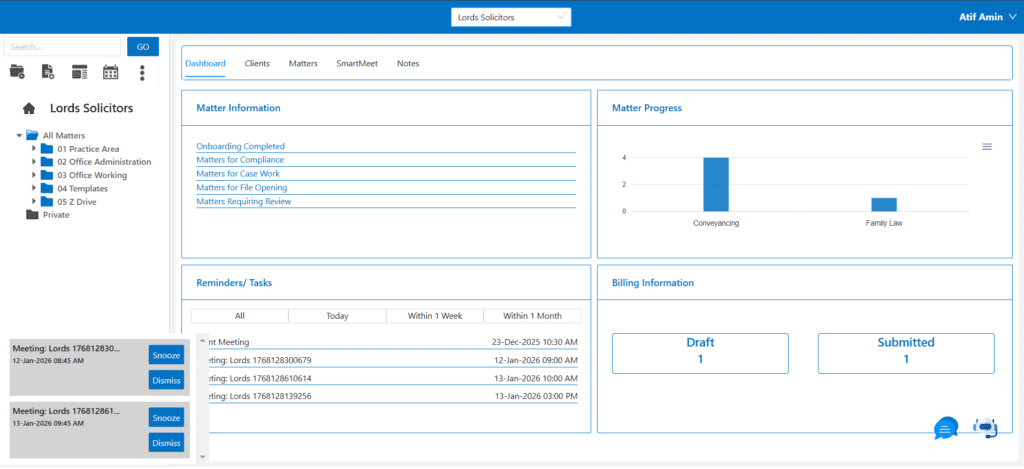
SmartLex’s dashboard provides law firms with a comprehensive overview of key areas of their
practice management. The platform centralizes client information, case management,
communication, and more to streamline operations and improve efficiency.

Matter Information

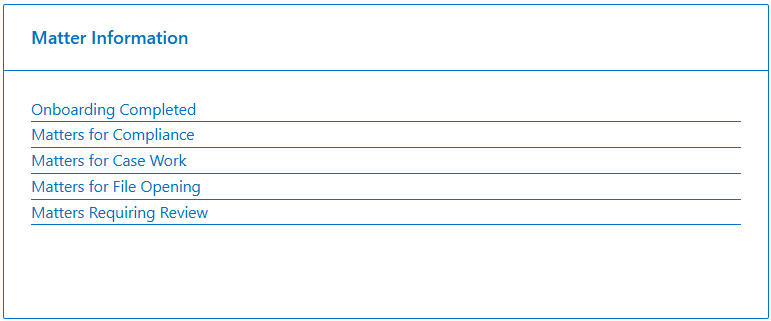
The Matter Information section offers a snapshot of all ongoing and pending legal matters. The
dashboard displays categorized data:

  • Onboarding Completed: Matters that have completed the onboarding process.
  • Matters for Compliance: Cases requiring compliance-related actions.
  • Matters for Case Work: Active matters needing case-specific work.
  • Matters for File Opening: Pending matters for which the files need to be opened.
  • Matters Requiring Review: Matters that need review before further action.


This section ensures that legal teams have immediate access to the most pertinent details, helping them stay organized and focused on the tasks that require their attention.

Matter Progress

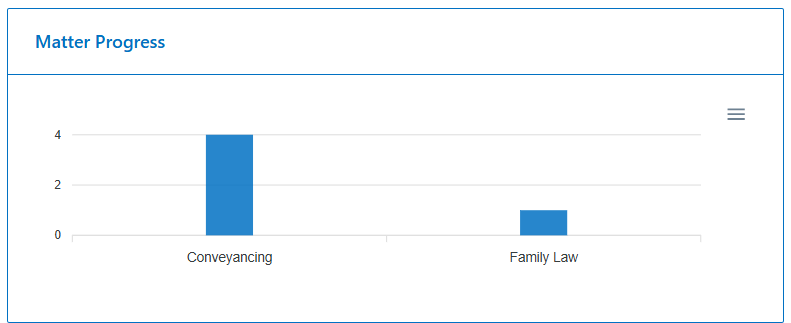
The Matter Progress section provides a visual representation of the number of matters in each practice area, displayed through a bar chart. For example, if the law firm handles only two practice areas – Conveyancing and Family Law – the chart will categorize the progress as follows:
  • Conveyancing: The number of property-related matters.
  • Family Law: The number of family law matters, such as custody, divorce, etc.
This section enables legal teams to easily monitor the distribution of cases across different practice areas and ensures timely follow-ups for each category.

Reminders/ Tasks

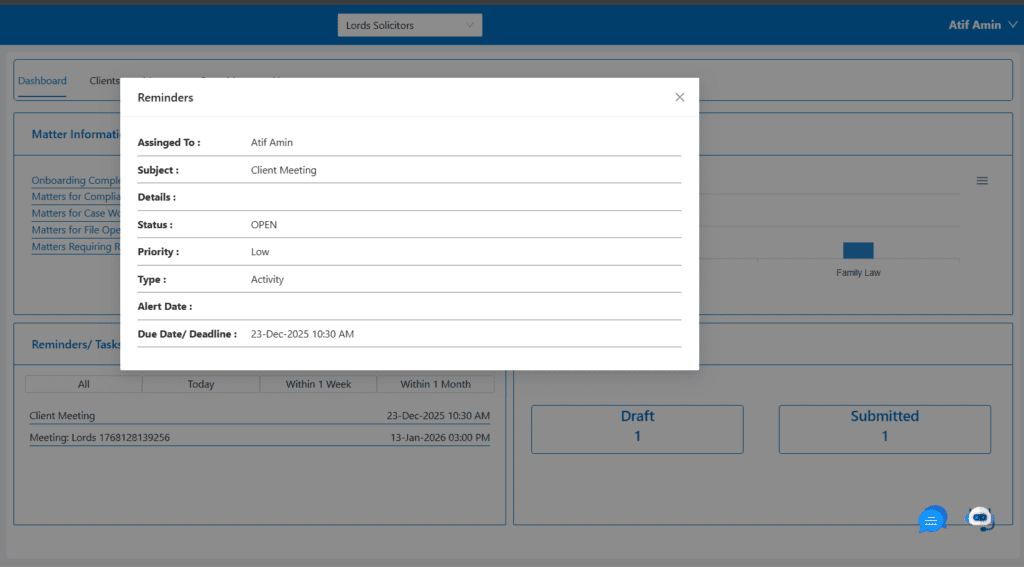
The Reminders/Tasks section serves as a task and deadline manager. It lists:
  • Client Meetings: Scheduled client meetings, including details like time, date, and client names.
  • Task Categories: Filters to view tasks due today, within a week, or within a month.
This feature ensures that important meetings and tasks are highlighted, helping firms stay on top of deadlines and appointments.

Billing Information

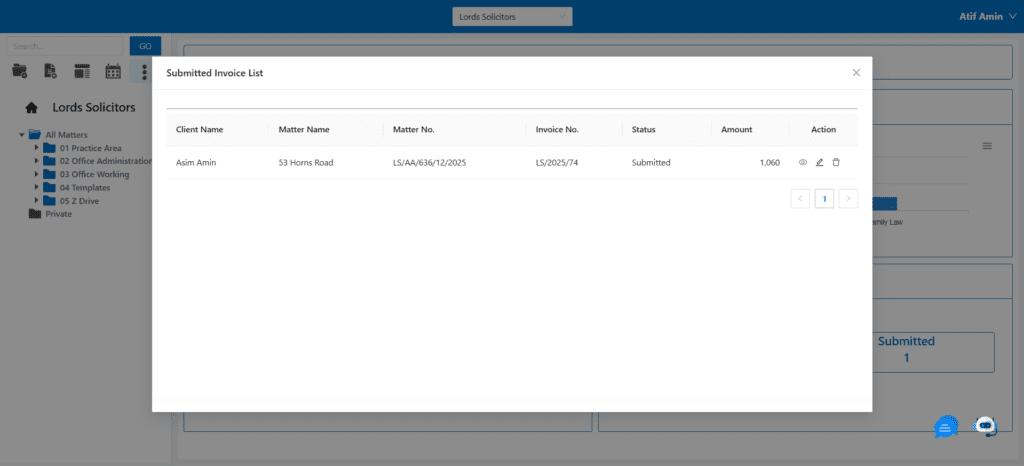
The Billing Information section provides an overview of billing statuses for ongoing matters:
  • Draft: The number of invoices or drafts awaiting review or completion.
  • Submitted: The count of invoices that have been submitted to clients.
This section aids in tracking the financial side of cases, ensuring that billing is up-to-date and transparent.

Matter

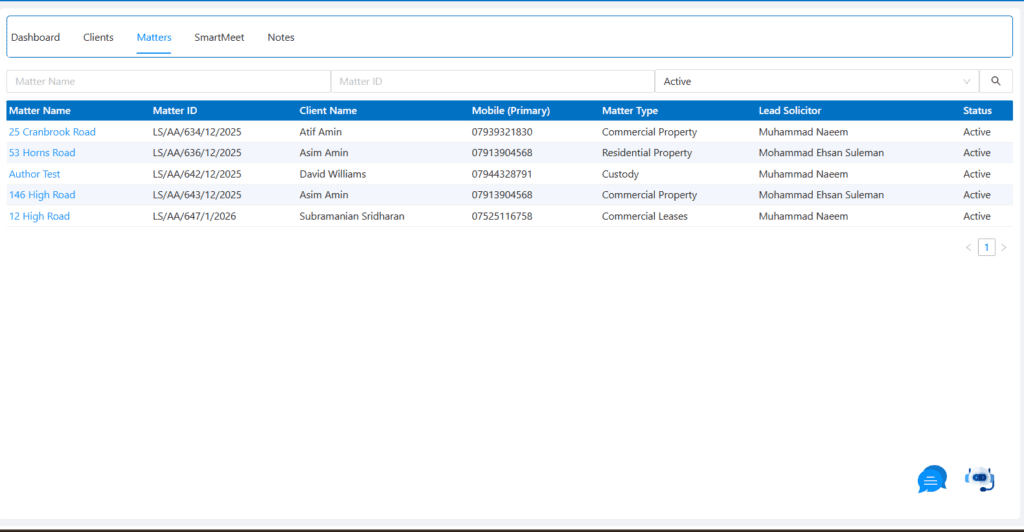
The Matters section tracks the details of individual cases, including:
  • Matter Name: Case titles or identifiers. • Matter ID: Unique ID associated with each matter.
  • Client Name: The client associated with each case.
  • Lead Solicitor: The solicitor assigned to handle the case.
  • Matter Type: Specifies whether the matter is related to commercial property, family law, or another category.
  • Status: The current status of each case (e.g., Active).
This section helps law firms easily track the progress and key details of each case.

Clients

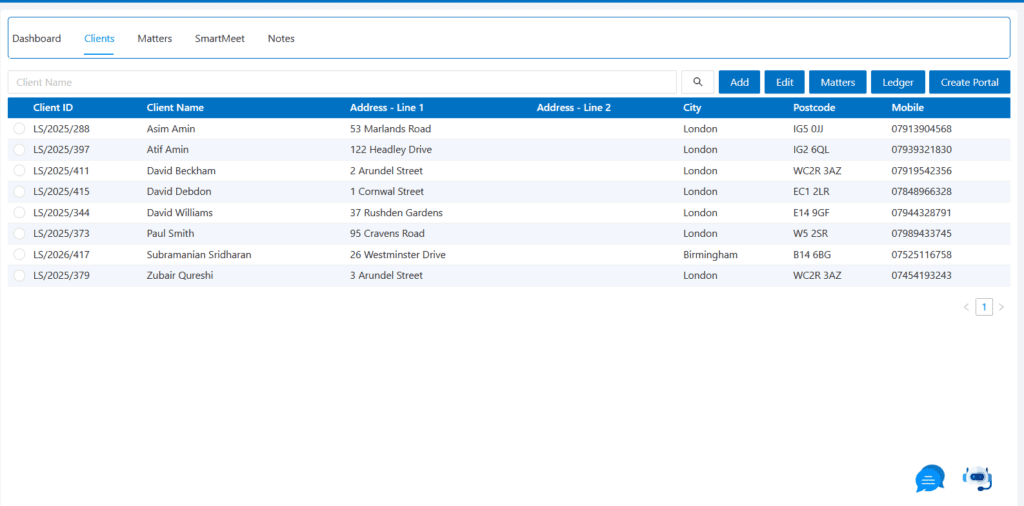
The Clients tab is where client details are stored. It features a table listing clients, including key details such as:
  • Client Name: The name of the client.
  • Address: Client’s address information.
  • Contact Information: Mobile numbers and email addresses.
  • Action Buttons: Options for adding, editing, or managing clients and their associated matters.
This section centralizes client management, ensuring that all relevant client data is easily accessible and editable for the legal team.

SmartMeet

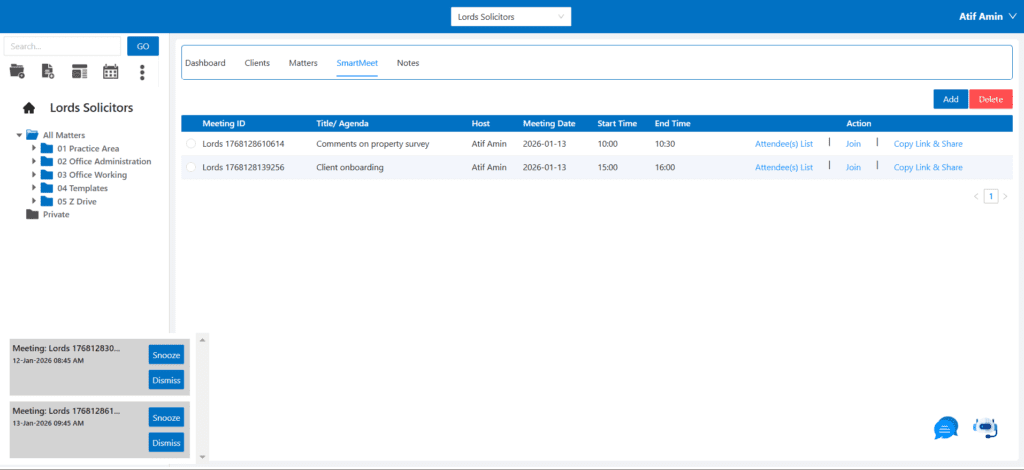
The SmartMeet tab manages meetings, emails, and other communications related to matters. The table includes:
  • Meeting Details: Information about meetings, such as date, time, and agenda.
  • Action Buttons: Options to view attendee lists, join meetings, or copy/share meeting details.
This section helps firms stay organized by tracking all communication linked to legal matters.

Notes

The Notes section allows users to create and save important notes for specific matters. Features
include:

  • Note Subject: A field for entering the subject of the note.
  • Text Editor: A rich text editor for detailed note-taking, including formatting options like bold,
    italics, and lists.

This section ensures that legal professionals can efficiently capture and store critical information
related to each case.

In nutshell, the SmartLex dashboard offers law firms a centralized, organized system for managing their practice. By incorporating essential tools such as task management, client details, matter progress tracking, and communication logs, it empowers legal teams to deliver better client outcomes, streamline operations, and improve overall efficiency. The integration of billing and reminders ensures that all aspects of legal practice, from client onboarding to case closure, are handled seamlessly.

Why Choose SmartPractice?

Comprehensive Case Management

SmartPractice consolidates all aspects of case management into one easy-to-use platform. From case creation to closure, manage everything in one place, improving efficiency and reducing the need for separate tools.

Seamless Integration with SmartLex Suite

As part of the SmartLex Suite, SmartPractice integrates seamlessly with other tools like SmartConnect and SmartFolders, ensuring that client data, documents, and case information flow smoothly between platforms.

Customizable to Your Firm’s Needs

SmartPractice is designed to be flexible, allowing you to customize workflows, task assignments, billing arrangements, and more. Tailor the platform to fit your firm’s unique processes.

Security and Compliance

SmartPractice is built with the highest levels of security in mind. All client data, documents, and communications are stored securely, and the platform ensures compliance with industry standards and legal regulations.

Have Questions? Get in Touch!

SmartLex Suite is here to revolutionize your legal practice. Contact us to schedule a demo, ask questions, or receive technical support. We’re ready to help you get started with AI-powered legal management.